Back to K1ÐÐU. =DDD's profile
K1ÐÐU. =DDD

Posts by K1ÐÐU. =DDD

27 posts

  1. #21
    Reply in Chat & Socialize


    September is launch month here at Bitdefender and we’ve been hard at work building the next generation of security solutions.


    After a very successful beta program, we’re proud to announce the final version of our consumer-oriented line-up that includes Bitdefender Total Security Multi-Device (Windows), Bitdefender Antivirus for Mac and Bitdefender Mobile Security and Antivirus


    And, if you’re wondering what could we possibly add to an already (close to) perfect security solution, we’re happy to report that Bitdefender’s 2017 line introduces Wi-Fi Security Advisor, which assesses the security of networks that users connect to on the go, such as those in coffee shops and airports, and reports on any vulnerabilities.


    Another important feature is Safepay™ with Wi-Fi Hotspot protection, which secures online transactions and keeps precious personal information safe.


    But probably the most important features that we built into the new version are taking place in our cloud infrastructure: the latest Bitdefender products include machine learning algorithms to fend off increasingly complex ransomware payloads which are spreading at alarming rates among home users.  Ransomware works by locking down crucial files and photos on users’ computers to then demand a ransom for the decryption key.


    Along with new feature additions, we have also dramatically improved some existing ones: Bitdefender’s product line, which includes Bitdefender Antivirus Plus, Bitdefender Internet Security and Bitdefender Total Security Multi-Device, comes with powerful features such as online banking protection, protection from phishing and fraud, Password Manager, Secure Browsing and others.


    “Bitdefender’s 2017 consumer line has a strategic advantage against other products, in that it was developed starting with the world’s best security software as a baseline,” said Bitdefender’s Vice President Consumer Solution, Ciprian Istrate. “This year, we have made it even better, with a greater level of protection and an extra-light impact on users’ computers.”


    If you’re curious about what is new and what is improved in the new release, head over to bitdefender.com and download any of the Windows flavors (Bitdefender Total Security Multi-Device, Bitdefender Internet Security or Bitdefender Antivirus Plus). If you’re a Mac user, you can download the Antivirus for Mac.


    If you already have a valid subscription, you can safely upgrade to the new version – your old license is valid for the new products as well.


    sursa: https://www.hotforsecurity.com/blog/the-new-bitdefender-is-here-new-features-across-the-board-and-better-ransomware-protection-16705.html?utm_source=SMGlobal&utm_medium=Facebook&utm_campaign=H4S

  2. #22
    Reply in Chat & Socialize

    1.

    Apasă tasta „Win + X”, (se va deschide un meniu în partea stângă a ecranului.)


    2.

    De aici alegi Command Prompt (Admin)


    3.

    După ce se deschide CMD tasteaza : control userpasswords2 (după care dai Enter.)


    4.

    In fereastra (User Accounts) trebuie sa debifezi opțiunea: „Users must enter a user name and password to use this computer”


    5.

    Dupa ce ai debifat optiunea dai OK. Trebuie sa iti introduci parola de 2 ori pentru ca optiunea sa se efectueze.


    6. Esti gata, mai trebuie sa dai Restart.

    Succes   !

  3. #23
    Reply in Chat & Socialize


    ACTIVARE CONEXIUNE

    În cazul în care conexiunea de internet nu funcționează, este posibil ca placa de rețea să fi fost dezactivată. Pentru a verifica: Dați click pe butonul Start, intrați în Control Panel, mergeți în "View network status and tasks" (sub "Network and Internet"), iar în panoul din stânga dați click pe "Change adapter settings". Dacă conexiunea apare cu un icon gri, dați click de dreapta pe aceasta, și alegeți Enable.


    Dacă aceasta apare cu un icon albastru și un X roșu, iar statutul afișează "cable unplugged", cablul nu este conectat sau firul este defect. În cazul în care dispozitivul se conectează prin cablu (nu prin wireless), asigurațivă că ați băgat cablul în calculator! Dacă acesta este conectat iar mesajul persistă, sunați la numărul pentru suport tehnic, afișat în pagina de Contact.


    PASUL 1 - Click stânga pe butonul Start


    PASUL 2 - Click stânga pe Control Panel


    PASUL 3 - Click stânga pe View network status and tasks


    PASUL 4 - Click stânga pe Change adapter settings


    PASUL 5 - Click dreapta pe conexiune


    PASUL 6 - Click stânga pe Disable pentru a dezactiva


    PASUL 7 - Click pe Enable pentru a activa


    PASUL 7 - Iconul este albastru (conexiune activă)


    PASUL 7 - Iconul este albastru cu un X roșu (cablul nu e conectat)


    sursa: CLICK AICI.


  4. #24
    Reply in Chat & Socialize

    [table style="color: rgb(0, 0, 0); font-family: 'Times New Roman'; font-size: medium; text-align: center;" align="center" border="0" width="100%"][tr][td]CONFIGURARE REȚEA[/td]

    [/tr]


    [tr][td]Pentru a configura rețeaua: În cazul în care sistemul de operare Windows este nou instalat, nu este nevoie de configurări speciale.


    Pentru tipul de conexiune oferit de noi, trebuie activat serviciul DHCP în setarile de rețea. În setarile Windows, serviciul DHCP este activat atunci când sunt selectate opțiunile pentru obținerea adresei IP automatic și pentru obținerea adresei serverului de DNS automatic.


    Pentru a verifica dacă setările sunt conforme, iată mai jos pașii pe care trebuie să-i urmați:


    PASUL 1 - Pagina de desktop


    PASUL 2 - Iconița Network Connection


    PASUL 3 - Click stânga pe iconița Network Connection


    PASUL 4 - Click dreapta pe iconița Network Connection


    PASUL 5 - Fereastra Network and Sharing Center


    PASUL 6 - Fereastra Local Area Connection


    PASUL 7 - Fereastra Local Area Connection


    PASUL 8 - Fereastra Internet Protocol Version 4


    [/td]

    [/tr]

    [/table]

  5. #25
    Reply in Chat & Socialize


    [spoiler="Windows10 -- Anniversary Update"][/spoiler]

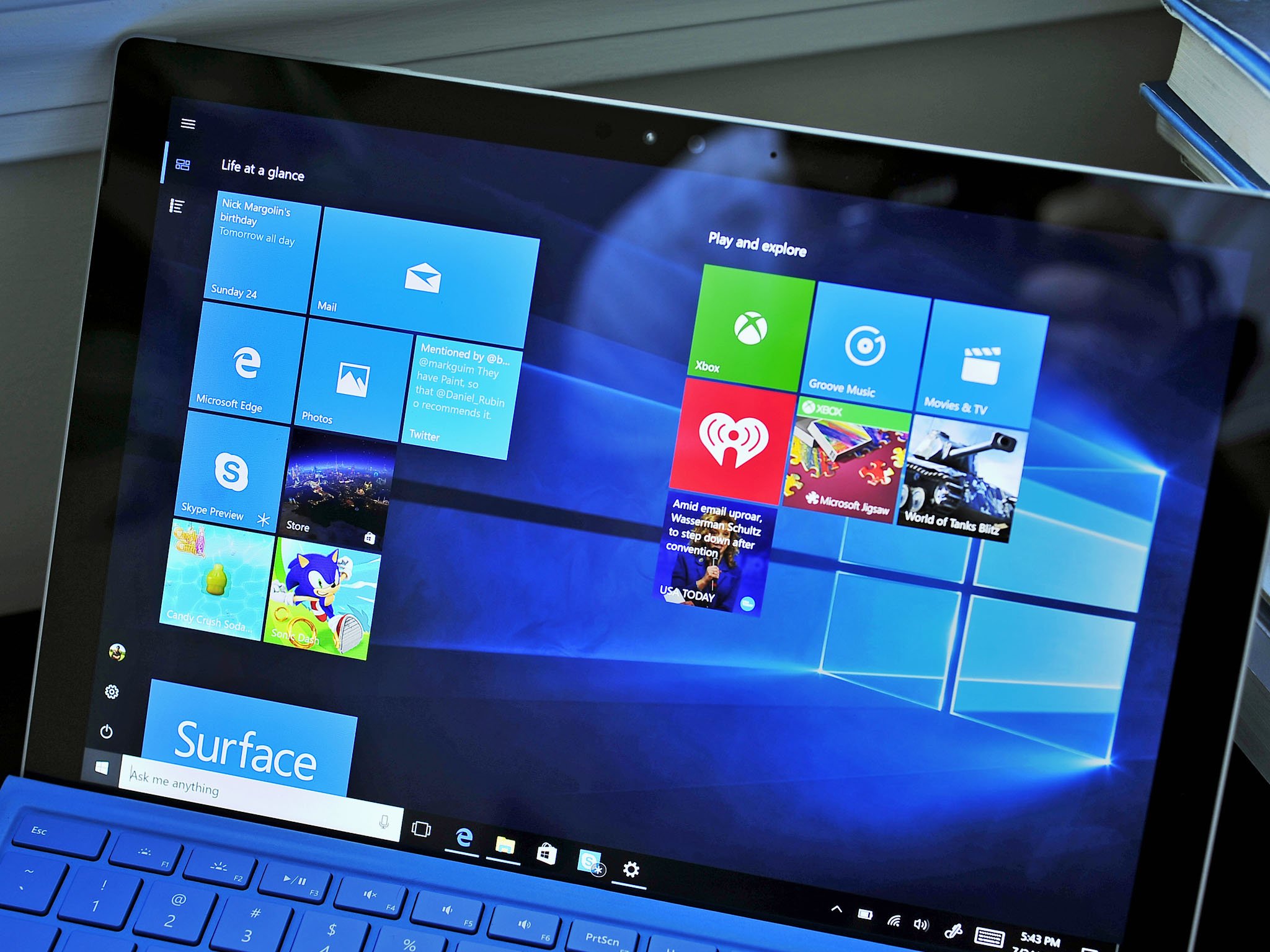
    Microsoft is rolling out the <a href="http://windowscentral.com/windows-10-anniversary-update">Windows10 Anniversary Update</a> starting on August 2nd. The new version of the operating system is a significant update with many improvements and features.</p>


    <p>In the new update, you'll find a lot of new changes. From <a href="http://windowscentral.com/here-are-three-biggest-features-windows-ink-windows-10-anniversary-update">WindowsInk's</a> advanced pen support to extensions in <a href="http://windowscentral.com/microsoft-edge/">Microsoft Edge</a> to improvements on the <a href="http://windowscentral.com/whats-new-start-menu-windows-10...">Start menu</a> and Cortana and much much more — there's a lot going on with the <a href="http://windowscentral.com/windows-anniversary-update/">Windows 10 Anniversary Update</a>. Microsoft will be progressively rolling out the update — but how you can get it as soon as possible?


    Not everyone will get the Anniversary Update on August 2nd, but eventually it will be available for all Windows 10 users, though it may take a day or two, or even a few weeks, for your specific device to gain access to the update. It depends on various factors, such as the device you're using, the method in which you obtained Windows 10, your location, and the load on the servers that are assigned to distribute the update.


    Microsoft is known to roll out new significant updates slowly in case something goes wrong during the release. If something happens, the company can quickly halt the roll out reducing the number of affected users.


    How to get the Anniversary Update from Windows Update


    The best way to get the Anniversary Update on your computer is by using Windows Update. Starting August 2nd, you can manually download the update using these steps:


    1. Open Settings.

    2. Click on Update & security.

    3. Click on Check for updates.


    Once your device connects successfully with the Windows Update servers, the update — listed as <strong>Feature update to Windows 10, version 1607</strong> — will begin downloading, then simply click the <strong>Restart Now</strong> button, and <a href="http://windowscentral.com/windows-10/">Windows10</a> will proceed to finish the installation. This process works in the same way as regular updates work for Windows 10


    Warning: in case you have problems with windows update, and you cant upgrade it


    How to get the Anniversary Update using the Media Creation Tool


    Alternatively, you can use the Media Creation Tool to perform an in-place upgrade or a clean installation of the operating system with the Anniversary Update. However, Microsoft often delays the availability of new versions through different methods for the sake of stability of the servers. As such, it could take a little bit of time until you can use this method to upgrade your computer.</p>


    <p>Once the Windows 10 Anniversary Update is available you can use the following steps to upgrade:


    <a href="http://go.microsoft.com/fwlink/?LinkID=799445"><strong>Downloadthe Media Creation Tools</strong> from Microsoft</a>.</li> (Download Starts Automatically)

    <li>Double-click the <strong>MediaCreationTool.exe</strong> to launch the tool. Follow the steps until you get to Windows 10 Setup.</li>

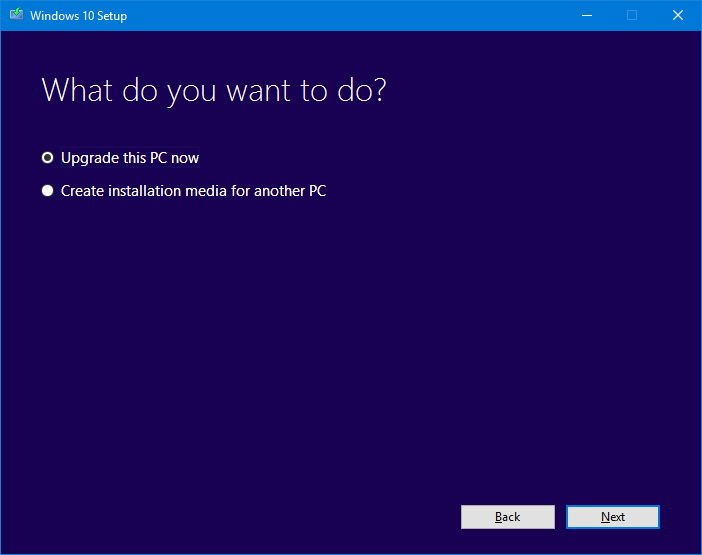
    <li>Select <strong>Upgrade this PC now</strong>.</li>

    <li>Click <strong>Next</li></strong>


    Once the download completes, click <strong>Accept</strong> to agree to the terms.</li>

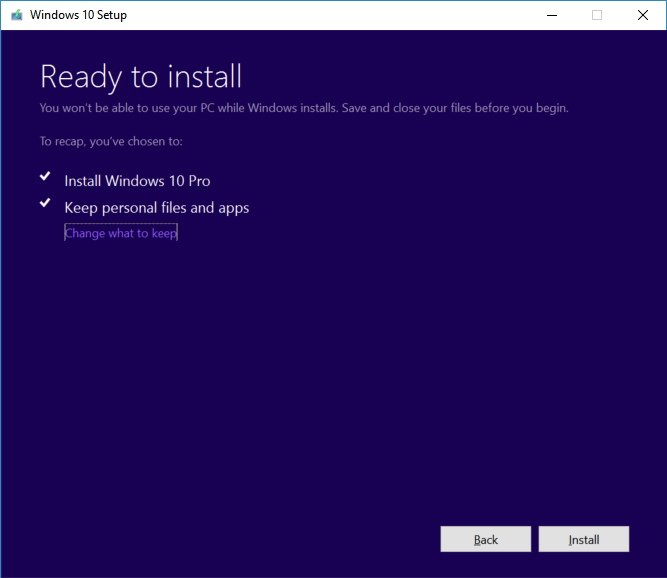
    <li>Make sure the installer is set to <strong>Keep personal files and apps</strong>, which should be the default behavior. (If it's not, click the <strong>Change what to keep</strong> link to change the settings.)</li>

    <li>Click the <strong>Install</strong> button to begin the update process.


    At this point, the Windows 10 setup will start the installation of the Anniversary Update on your device preserving your files and apps. The upgrade process can take some time depending on your internet speeds, hardware, and other factors, but from the most part, it shouldn't take longer than 30 minutes.

  6. #26
    Reply in Chat & Socialize


    Salut, și bine v-am regăsit la un nou tutorial: „cum instalez un IP.Board prin Hosting?!”


    ----------------------------------------------------------------------------------------


    &nbsp;


    _ _ _ _ _ _ _ _ Informații | IP.Board (3.4.X) _ _ _ _ _ _ _ _ _


    &nbsp;


    Versiune: [3.4.6]


    Downloaded From: -


    ----------------------------------------------------------------------------------------


    _ _ _ _ _ _ _ _ RO: Cum se Instalează IP.Board (3.4.X) _ _ _ _ _ _ _ _


    &nbsp;


    1: vom avea nevoie de un webhosting. (putem folosi: Hostinger România, sau 000WebHost)


    2: ne ducem în:


    Website =&gt; import website =&gt; importăm IP.Board (.zip)


    3: trebuie să creem baza de date.


    ne ducem în:


    Găzduire =&gt; Selectare Cont =&gt; Fișiere =&gt; Bază de Date MYSQL.


    ----------------------------------------------------------------


    următorii pașii, o să vii arăt aici: http://imgur.com/geUWp1n.png


    ----------------------------------------------------------------


    după ce ați terminat de adăugat detaliile, acum trebuie făcut cont-ul: http://imgur.com/nmF8g9g.png


    ----------------------------------------------------------------


    după ce ați terminat de făcut cont-ul, și ați dat next, instalarea poate începe, dați click pe „Start Installation...”


    ----------------------------------------------------------------


    Atenție: dacă vrei să instalezi un hook, o poți face din 2 lucruri:


    =&gt; te duci pe (http://invision-virus.com), și downloadezi hook-ul.


    (ATENȚIE: NECESITĂ CONT)


    =&gt; Filezilla FTP (te loghezi cu datele, bagi și instalezi)


    [DOWNLOAD]SmartFTP: http://www.smartftp.com/get/SFTPMSI64.exe(64-bit)


    =&gt; sau din forum direct. (nu știu sigur dacă merge, eu nu am încercat)


    ----------------------------------------------------------------


    „cum ne logăm în Filezilla FTP?”...


    ----------------------------------------------------------------


    Filezilla Login:


    &nbsp; &nbsp;=&gt; Host: (cpanel.hostinger.ro)


    &nbsp; &nbsp;=&gt; Username: (Numele tău)


    =&gt; Password: (Parola Ta)


    =&gt; Port: (Port-ul dvs)


    după ce ați apăsat pe „Quickconnect” puteți să instalați Hook-ul.


    Succes!


    Poză / Screenshot:


    DACĂ ÎNTÂMPINAȚI PROBLEME CU FTP-UL, TE ROG SĂ MĂ CONTACTEZI!


    ----------------------------------------------------------------


    RO: dacă întâmpini probleme cu instalarea IP.Board, mă poți contacta :).


    Support-ul pentru Prieteni, este GRATIS!


    (SUPPORT INCLUS: 24H / DACĂ AU TRECUT 24H NUMAI OFER SUPPORT!)


    DACĂ AU TRECUT 24H, SE OFERĂ SUPPORT DOAR PENTRU PRIETENII GRATIS!


    ----------------------------------------------------------------


    Last Updated: [01.04.2016] | ORA: 02:05 (NOAPTEA)


    Copyright © 2016 - Toate drepturile sunt rezervate. Tutorial IP.Board creaat de @mihaiT. si modificat de @mihaiT. pentru cei care îl citesc.

  7. #27
    Prezentare @ mihaisupport
    Reply in Introduce Yourself

    Prenume : Mihai Băjenaru

    Vârsta : 18

    Oraș / Localitate : București, România

    Ocupație :Gaming, iT, Support, rețele sociale...

    Interese și pasiuni : IP.Board...,

    Ce gen de muzică ascultați ? : normal,și uneori manele :))

    Care este jocul dvs. preferat ? : sunt multe....SA-MP,CS 1.6,Grand Theft Auto V,Gta IV,Vice CIty...

    De unde ați auzit de ECILA România ? : @MaxiM

    Ce ați face dacă ați fi pentru o zi Administrator aici ? : aș face, orice ar face un administrator nu?

    Acordă o notă comunității : 10/10

    Contact ( la alegere ) : roby.preda1 (skype)

    Un mesaj pentru membrii comunității : să vă chiș`-n freză ))